
Clinic leaders often ask about AI: "What would it actually do inside our software?" Not a website chatbot or a new system. What changes between opening a chart and signing the note?
Here are concepts that work with today's technology, shown on a demo clinic system with a fictional patient. No percentages or promised time savings, just the workflow and where the doctor stays in control.
The video and screens below are a demonstration built with fictional patient data. They are not a system running in a real clinic. This post is not legal or regulatory advice.
Watch the demo
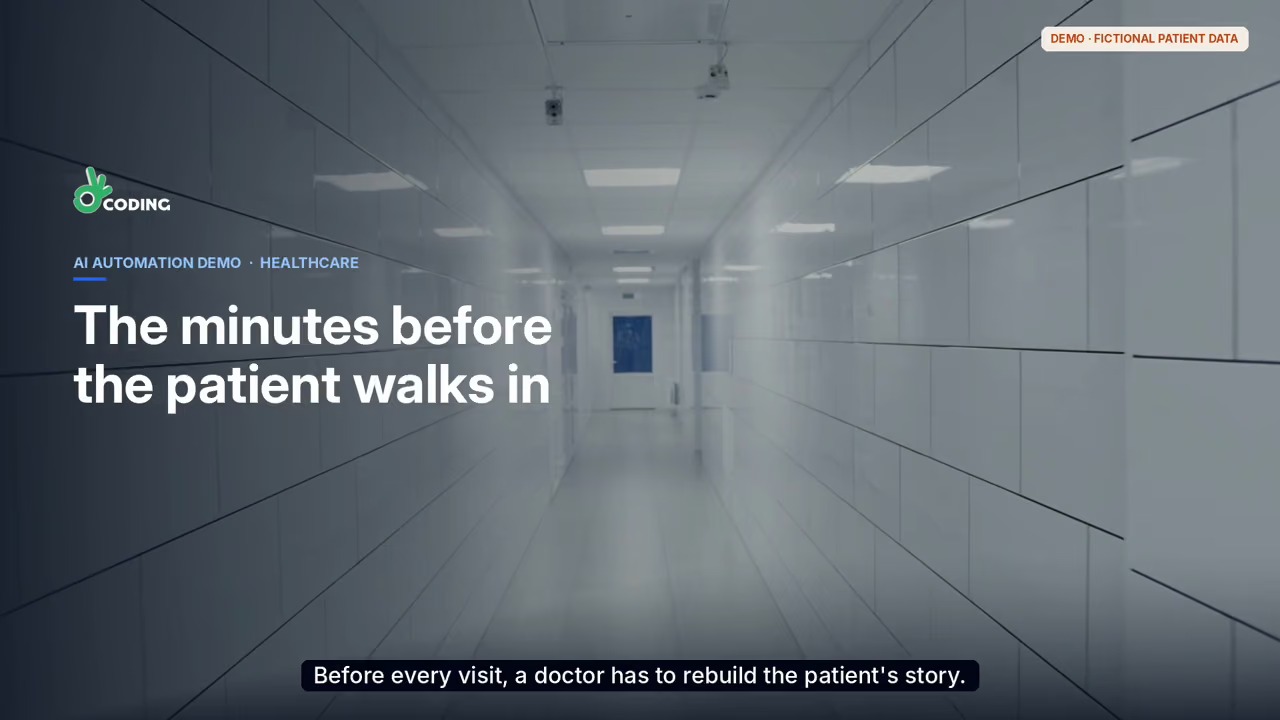
The video at the top of this page shows the whole workflow in a working demo program, MedRecord, a fictional clinic system with a fictional patient. You see the doctor do the pre-visit work by hand, then the same visit with background automation: permitted data collected, a summary with source links, lab changes flagged, and a note, lab order and referral drafted from the doctor's own plan. Nothing is saved until the doctor reviews, edits and signs. Access is role-based and logged, and the signature is recorded.
The demo program also counted the work at a scripted pace: 1:48, 23 clicks and 19 screens by hand, against 0:41, 10 clicks and 1 screen with automation. That's a measurement of this one scripted demo, not a clinical efficiency claim. A real clinic's numbers depend on its system and its doctors.
The problem: the chart review before every visit
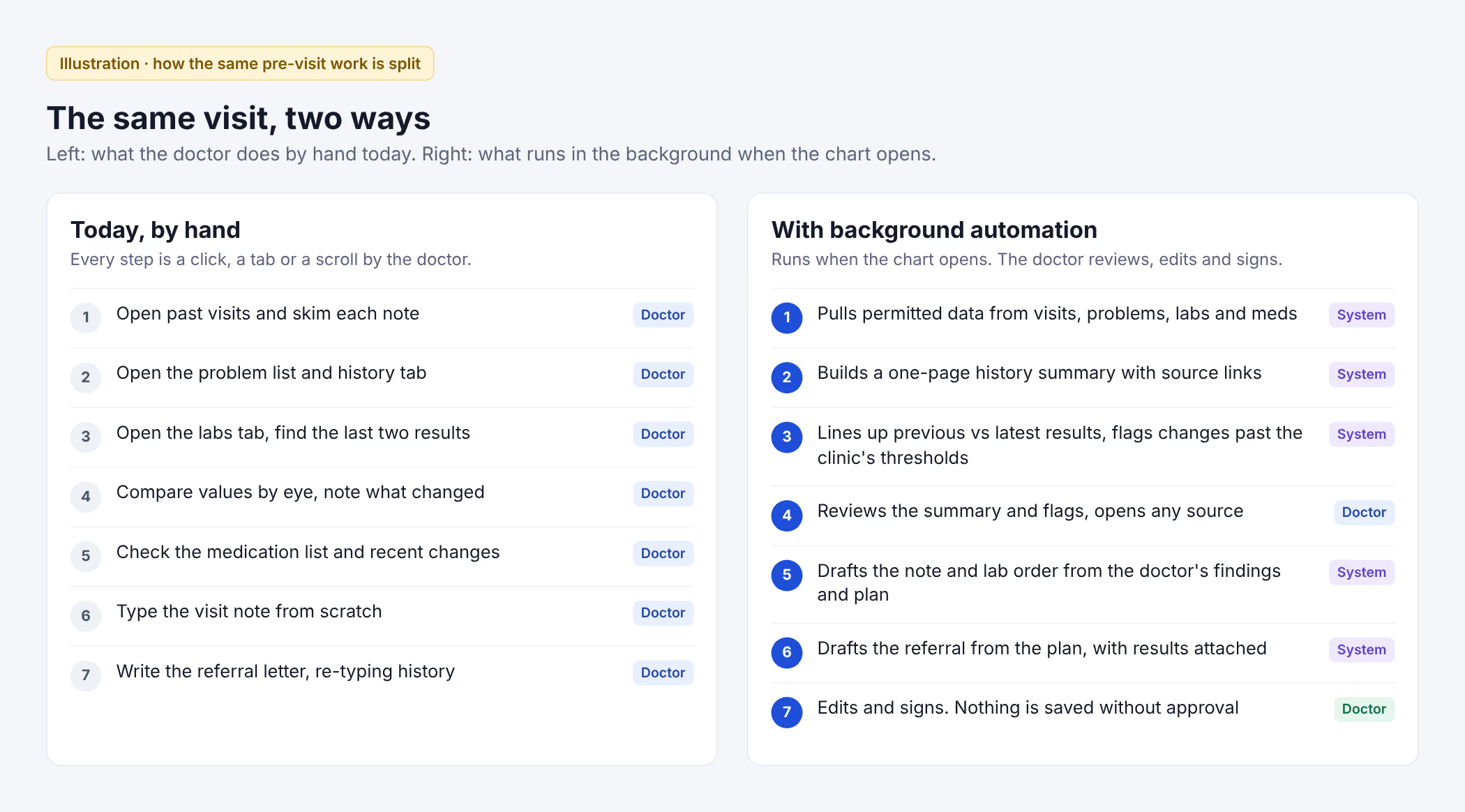
Before a follow-up, a doctor checks past notes, the problem list, new versus old lab results, medication changes and open referrals. In most EHRs these live on different tabs. The doctor clicks through each, compares numbers by eye, then types a note and maybe a referral that repeats the same history.
None of this is hard. It's repetitive, it happens for every patient, and software is good at preparing it.
What "background AI" means here
There's no separate chatbot. When the doctor opens the chart, the automation works in the background and leaves drafts inside it:
- It reads only the data it has permission to read.
- It prepares a summary, a results comparison and document drafts.
- It shows everything to the doctor marked as a draft, with links back to the source records.
- Nothing is saved to the record, sent or ordered until the doctor approves it.
That last point is what makes this safe enough to try. The doctor stays the decision-maker. The software just does the gathering and the first draft. It's the same split of narrow, well-defined jobs we describe in one assistant, many specialists.
Concept 1: A pre-visit summary with sources
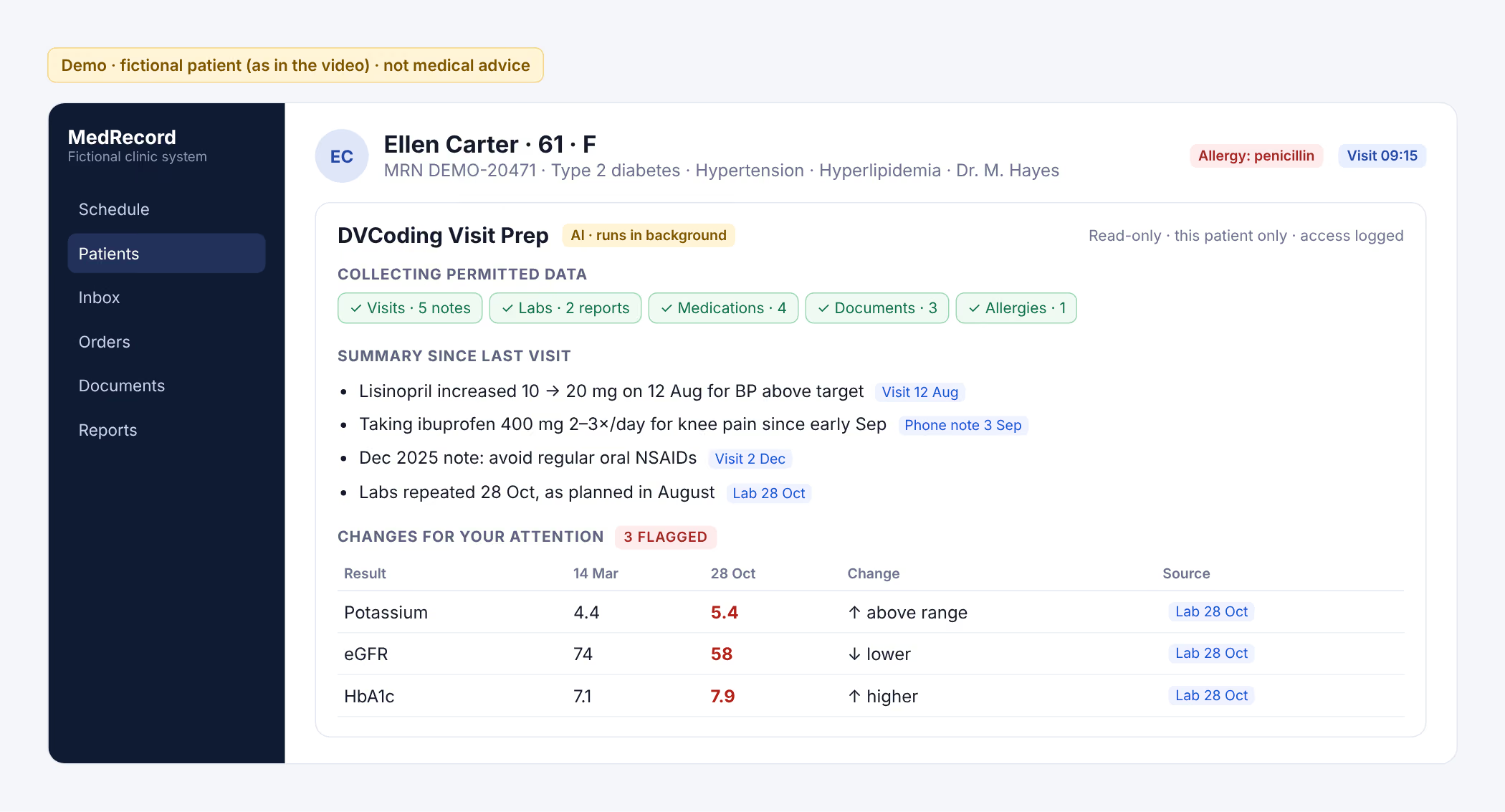
When the chart opens, the system collects the permitted data (visit notes, lab reports, medications, documents and allergies) and writes a short summary of what changed since the last visit. In the demo, that's a blood pressure medication increase, a phone note about regular ibuprofen use, an earlier note to avoid NSAIDs, and new labs. Every line links to the record it came from, so the doctor can check anything in one click instead of trusting the summary blindly.
Current language models summarize well when limited to the patient's own records and required to cite them.
Concept 2: Comparing previous and latest results
The table in the screen above lines up the March and October results side by side and flags three changes: potassium 4.4 to 5.4, eGFR 74 to 58, and HbA1c 7.1 to 7.9, each linked to its lab report. This part shouldn't be "AI" at all. It's plain rules the clinic sets, such as "flag eGFR if it drops by more than a set amount." Rules are predictable and easy to explain, and the clinic's physicians decide what counts as a meaningful change.
This also matters for regulation. The FDA's guidance on clinical decision support software (updated in January 2026) separates software that supports a clinician from software regulated as a medical device. One key criterion is whether the clinician can "independently review the basis" for what the software shows. Showing the values, dates and the rule behind every flag keeps the doctor able to do exactly that.
Concept 3: A visit note draft from the doctor's own words
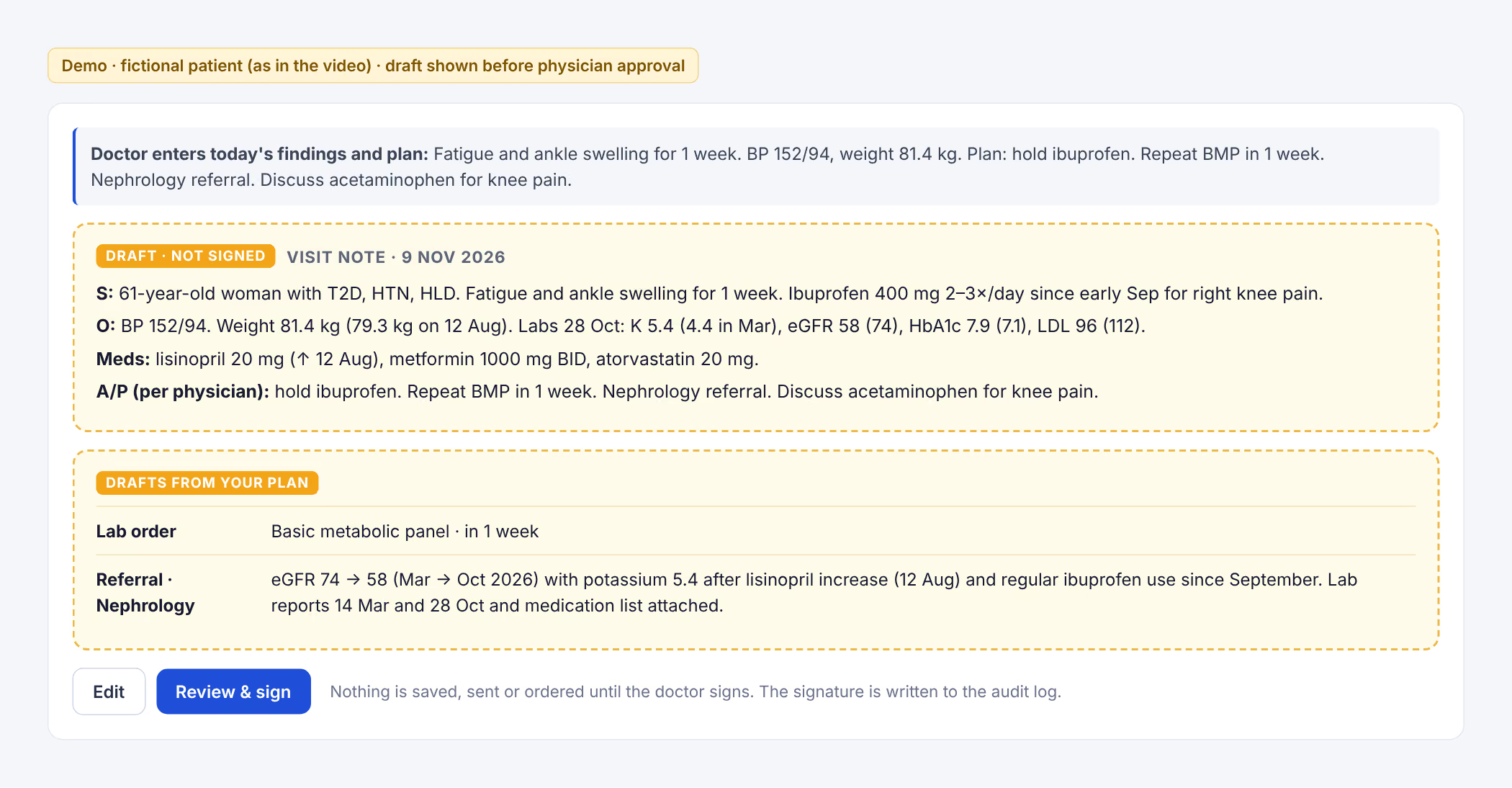
The doctor enters today's findings and the plan in a few short lines. The system turns them into a structured draft visit note and fills in the medications and exact lab values from the chart, so nothing has to be retyped.
The plan comes from the doctor, and the draft marks it "per physician." The automation doesn't diagnose or choose treatment.
Concept 4: Lab orders and referrals, drafted from the plan
Once the plan is clear, the paperwork is mostly copying. In the demo, the plan says "repeat BMP in 1 week" and "nephrology referral," so the system drafts the lab order and a referral letter that states the reason and attaches both lab reports and the medication list. Both stay drafts until the doctor reviews, edits and signs.
How it connects to the system you already have
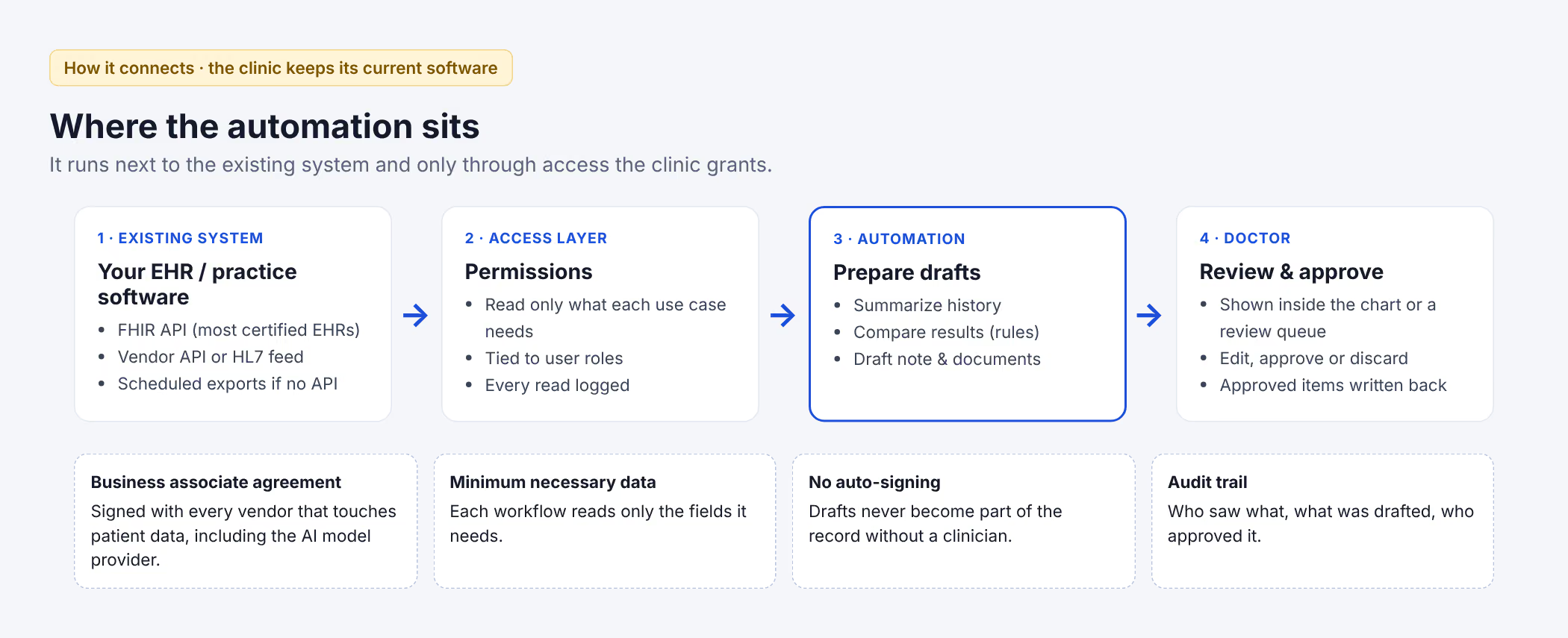
You usually don't need to replace your EHR. Health IT certified under the federal ONC program must offer a standardized FHIR-based API (certification criterion § 170.315(g)(10)), which gives approved applications read access to core patient data such as problems, medications and lab results. Writing drafts back into the chart often uses the vendor's own API or integration tools, so what's possible depends on your vendor and your contract.
Security and HIPAA basics
Any vendor that handles patient data for a clinic is a business associate under HIPAA. HHS's guidance on cloud computing says a cloud provider that stores or processes ePHI is a business associate "even if the CSP processes or stores only encrypted ePHI and lacks an encryption key for the data." In practice:
- Sign a business associate agreement with every vendor in the chain, including the AI model provider.
- Give each workflow access only to the data it needs, tied to user roles.
- Log every read, every draft and every approval.
- Never let a draft become part of the record without a clinician signing it.
Frequently asked questions
Do we have to change our EHR to use AI automation?
Usually not. If your system has an API (most certified EHRs offer a FHIR API) or reliable exports, the automation can run alongside it. What it can write back depends on your vendor.
Does the AI make clinical decisions?
No. In this design it gathers data, compares results using the clinic's own rules and drafts documents. The doctor reviews, edits and approves everything.
Where should a clinic start?
Pick one repetitive task with clear inputs, such as pre-visit summaries for follow-up visits, and test it with fictional or de-identified data before it touches real patients. Our guide on what to automate first explains how to choose.
We build custom AI automation that works with the software a business already uses, including custom CRM and internal tools, and we keep it running with ongoing support. More on how we approach repeatable operations: run operations on rails. If you want to see whether your clinic's system could support workflows like these, book an AI automation consultation.
This article describes approaches and how our demos behave. It does not report measured customer outcomes unless it says so with methodology and permission.